
Typical ways Unicode characters can unintentionally appear in messages
The most common way Unicode is unintentionally added to a message is by drafting your text in another program and then copying and pasting it into the SMS content field (whether in MXT or through third‑party software).
Applications like Microsoft Word and Microsoft Outlook often substitute standard characters—such as the word “and”—with Unicode versions. These Unicode replacements tend to appear more angled or stylized compared to their standard encoded counterparts.
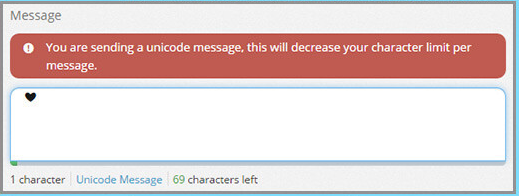
If you send an SMS from CXT and your message contains a Unicode character, a warning box will appear notifying you that “This is a Unicode message.” Removing any Unicode characters from the message field will dismiss the warning.
Tip: A simple way to avoid Unicode is to paste your SMS content as plain text
