
Information about using Unicode characters when sending messages in CXT
If you try to send an SMS that includes a Unicode character, CXT will display a warning box stating ‘This is a Unicode message’.
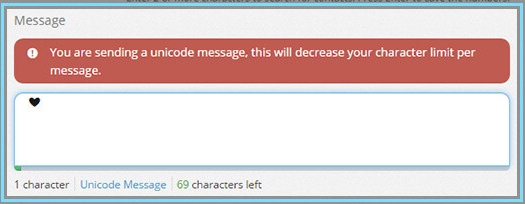
To prevent Unicode characters from appearing in your message, avoid copying and pasting text from external programs such as Microsoft Word into CXT. Whenever possible, compose your message directly within CXT.
One helpful way to reduce accidental Unicode is to paste your SMS content as plain text.
The character counter beneath the message field will also update to reflect the remaining characters for a Unicode message (the limit for a Unicode message is 70 characters).
Removing any Unicode characters from the message field will close the warning box and return the character count to the standard SMS calculation.
For additional details, please see Understanding Unicode characters.
